


Put reviews in the channel people already watch
Product and support can see new feedback without opening another dashboard.
Slack integration
Bring reviews from your iOS and Android apps into the Slack channels your product and support teams already use. Give each app its own route and keep follow-up in the thread.
14 days free · No credit card required
iOS + Android alerts to one Slack channel: $10/month, billed annually at $120 for two Flows. Optional add-ons and tax are additional.
 # app-reviewsChannel
Product and support can see new feedback without opening another dashboard.
Choose the ratings and locales that belong in each channel.
Add Reply-to-Review for $10/month per Flow, billed annually, to answer eligible App Store and Google Play reviews from the alert.
How it works
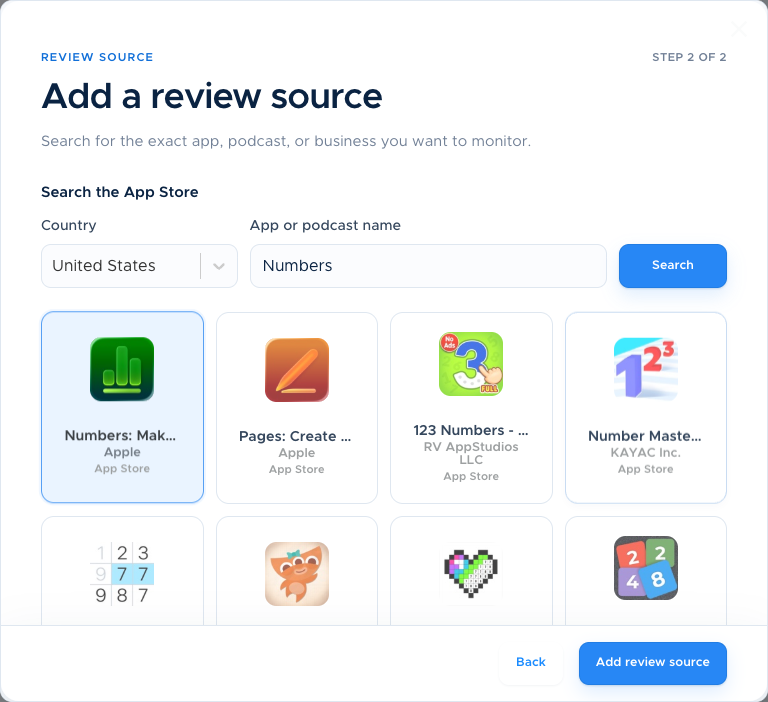
Choose the App Store or Google Play listing you want to monitor.
Authorize the workspace and select a channel.
Choose ratings and locales, then save the Flow and check the setup message. Confirm a new matching review separately; the setup message only checks the connection.
Made for your workflow
Route each app’s reviews to the people responsible for it. Your team can discuss a review in its Slack thread and decide who follows up.
Compare plans and optionsAuthorize Slack, then select exactly where the Flow should post.
Use one Flow for low-star reviews and another for a different source, rating range, or region.
Post reviews as they arrive or send a weekly or monthly summary.
Enable Reply-to-Review for $10/month per Flow, billed annually, to answer supported App Store and Google Play reviews directly from Slack.
Each store listing and Slack channel pair uses one Flow. These examples use base review alerts; replies, global coverage, translation and weekly reports cost extra.
Prices in USD, before tax. Reply-to-Review is optional at an additional $10/month per enabled Flow, billed annually at $120 per Flow.
Simple, flexible pricing
One store listing, one destination. An iOS app and an Android app sent to the same channel use two Flows.
Weekly reports, global coverage, translation, and replies are optional paid add-ons.
See all pricing and add-onsReviewBot can post new review alerts and scheduled status reports with review context, rating, source details, and direct links where available.
Yes. The Reply-to-Review add-on costs $10/month per enabled Flow, billed annually, and lets eligible App Store and Google Play accounts reply directly from Slack.
Yes. Configure rating and locale filters so each Slack Flow posts only the feedback that channel owns.
Yes. Configure star filters and choose the country or language for the channel’s ownership.
The Slack authorization step requests the permissions required to select the workspace/channel and deliver the configured alerts. Review the OAuth consent screen before approving.
Yes. Create separate Flows for apps, stores, channels, or alert policies.
Evaluating your options? Compare ReviewBot with Appbot, or read the setup guide for this workflow.
Plan the next step: configure negative-review alerts, assign review follow-up, or use a worked weekly report example.
Create your first Flow. Try every feature free for 14 days.
Start free trial