Choose who sees it
Send each Flow to the individual or shared inbox responsible for that listing.
ReviewBot for email
Send app-store and Google Business reviews to the inbox that owns the response. Keep the rating and customer’s words together, and reply by email on eligible Flows.
14 days free · No credit card required
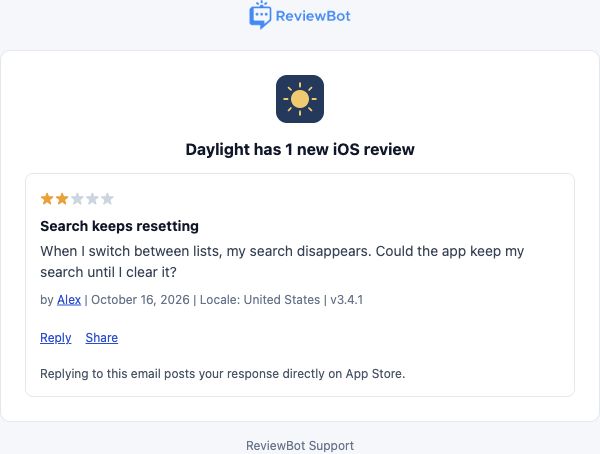
Send each Flow to the individual or shared inbox responsible for that listing.
Choose ratings and source-specific country or language options. Keep each inbox focused on the feedback it needs.
Connect an authorized App Store, Google Play, or Google Business account and enable replies on the Flow.
Reply by email
Reply to a review email from a reply-enabled Flow using its original reply address. Your message is submitted as a public response to the connected review platform.
Email setup and reply instructionsKeep only the response you want customers to see. Remove signatures and private details. ReviewBot emails the result, including failures or a pending moderation status where applicable.
Sending the email submits the response. There is no additional preview step in the email workflow.
Flow-based pricing
One Flow connects one review source to one email destination. Use another Flow when a different app, location, or team needs its own feed.
See plans and add-onsYes. Connect the email destination your team uses and select it in the Flow. Review who can access a reply-enabled inbox because sending a reply submits a public response.
Replies require an eligible App Store, Google Play, or Google Business Profile account, permission to respond, and Reply-to-Review enabled on the Flow. Apple Podcasts reviews do not support this reply workflow.
Create a separate app report Flow for scheduled rating summaries. Monthly reports are available with the base Flow; weekly delivery is an optional add-on. Google Business Profile supports review alerts, not scheduled reports.
ReviewBot checks the Flow and source permissions, submits an eligible response, and emails the result. A submitted response may still be pending the review platform’s moderation. For Google reviews that already have a reply, edit the response in Google Business Profile.