Keep the right people informed
Send reviews to a product or support space, or keep a personal feed in a direct message with ReviewBot.

ReviewBot for Google Chat
Bring App Store and Google Play feedback into the conversation your team already follows. Catch low ratings, discuss the details, and decide what to do next.
14 days free · No credit card required
Already have ReviewBot? Connect Google Chat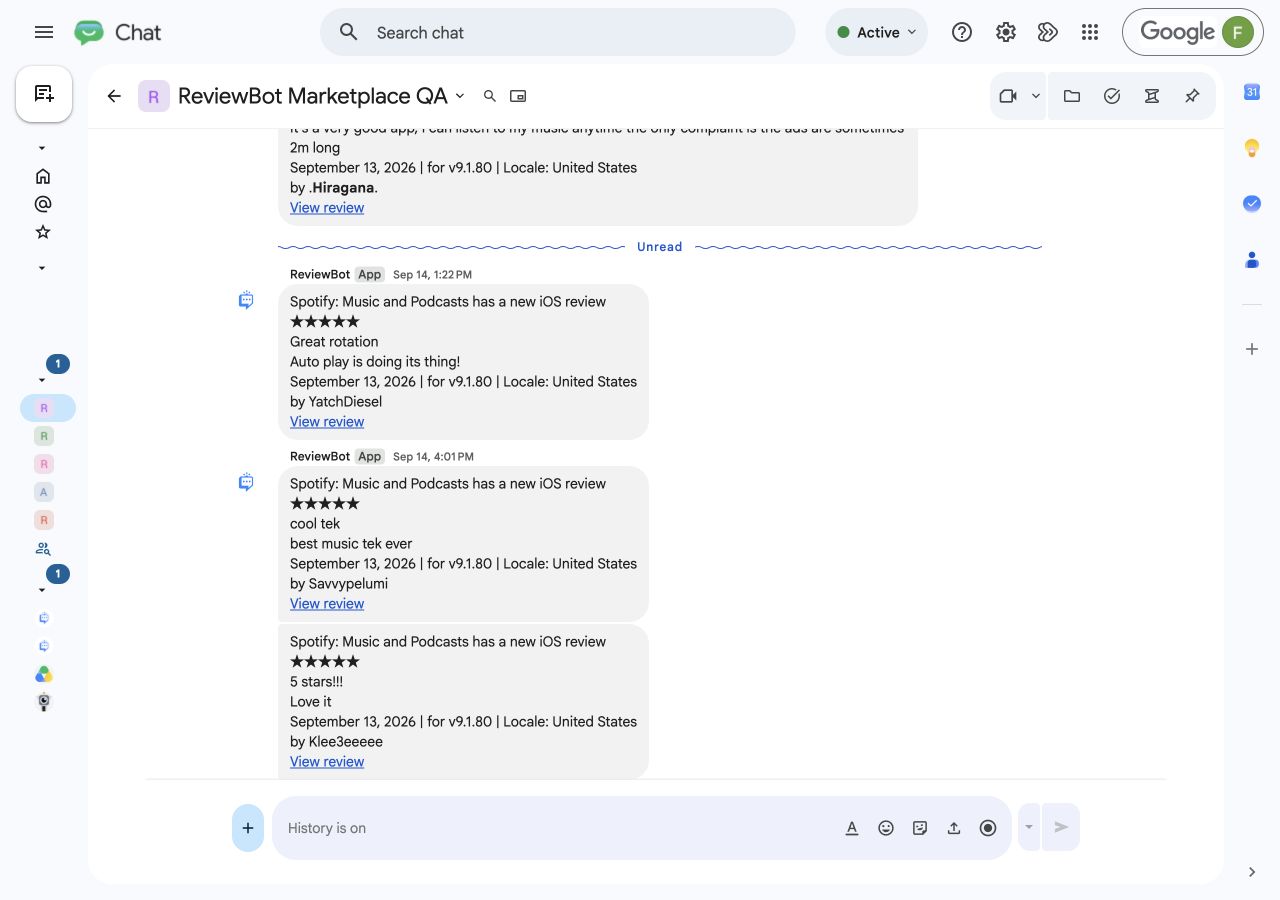
Send reviews to a product or support space, or keep a personal feed in a direct message with ReviewBot.
Filter by star rating and locale. Use separate Flows when different apps or teams need different review streams.
Alerts include the rating, review text, author, date, available locale and version details, and a link to the review.
Native app setup
You need a Google Chat account with permission to add ReviewBot, plus an active ReviewBot trial or paid plan.
Open Google Chat setupFull setup and troubleshooting guideInstall ReviewBot from Google Workspace Marketplace. Add it to the space your team follows, or open a direct message with it. Your Workspace administrator may need to allow the app.
Send connect to ReviewBot. In a space, mention @ReviewBot with the command. The bot sends you a private, single-use code that expires after 10 minutes.
Open Google Chat setup in ReviewBot, choose the ReviewBot app connection method, and enter the code. Keep the code private: it authorizes delivery to that conversation.
Create a review-notification Flow, select an App Store or Google Play listing, set your rating and locale filters, and choose the connected conversation. Save the Flow and check that its setup message arrives.
Flow-based pricing
One Flow sends one store listing to one conversation. An iOS listing and an Android listing sent to the same space use two Flows.
Installing the Marketplace app is free. Continued review delivery requires a ReviewBot plan after the trial; optional global scanning and translation cost extra.
See plans and add-onsBoth work with the native ReviewBot app. Use a shared space to keep a team informed, or a direct conversation for personal monitoring. Each Flow connects one store listing to one destination.
ReviewBot delivers matching new and updated App Store and Google Play reviews as it collects them. Filter by star rating and country or language. Saving a Flow checks the connection with a setup message; it does not import the app’s full review history.
Google Chat supports review alerts and links to the original reviews. It does not publish app-store replies or deliver scheduled review reports. Choose a supported destination separately for those workflows.
Ask your Google Workspace administrator to allow ReviewBot. Incoming webhooks are an alternative for spaces when your organization permits them; the setup guide covers both methods.
The native app receives installation events and messages directed to ReviewBot. It stores the destination identifiers, your ReviewBot workspace connection, and temporary setup information. It does not fetch conversation history, Gmail, Drive, or Sheets.
Pause or delete the Flow in ReviewBot. Removing the native app from the conversation also stops delivery there. Reconnect with a new private code after reinstalling. Manage subscriptions separately in ReviewBot Billing.